For students
An easy place to write music
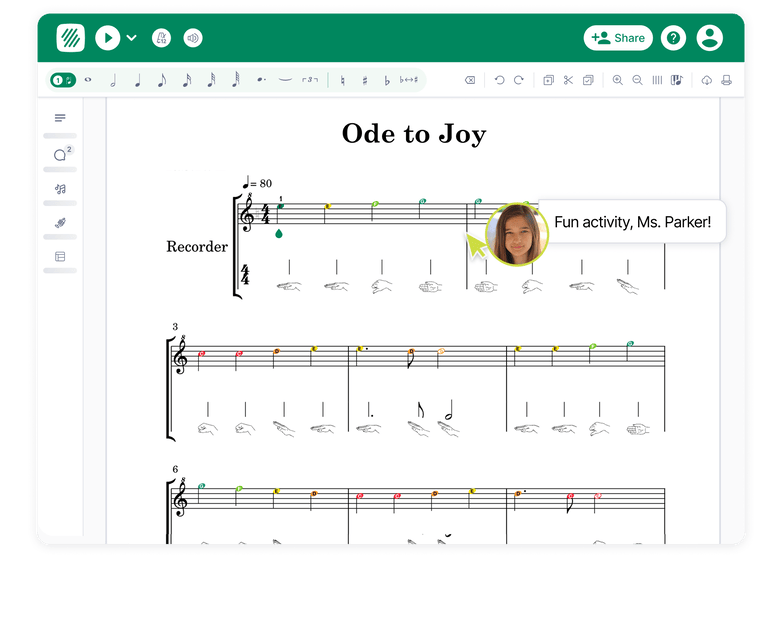
Students can compose, arrange and play back music in a distraction-free editor that works on Chromebooks, laptops and tablets.
For teachers and students
A browser-based music notation editor for students and teachers. Students compose, arrange and play back music on any device, while teachers create assignments, control notation tools by level, give feedback and mark work in one place.
30-day free trial.
No obligation. Cancel anytime.

Built for privacy.
Safe for every classroom.


















Works with what you already use.
Seamless integrations.
Students have an easy place to write music. Teachers have the classroom controls, assignment tools and feedback features they need.
For students
Students can compose, arrange and play back music in a distraction-free editor that works on Chromebooks, laptops and tablets.
For teachers
Google Classroom and Microsoft Teams on every plan. Canvas, Schoology, ClassLink and LTI on the School & District Plan.
See all integrations'%3e%3cpath%20d='M55.9991%2028C55.9991%2012.536%2043.4631%200%2027.9991%200C12.5352%200%20-0.000854492%2012.536%20-0.000854492%2028C-0.000854492%2043.464%2012.5352%2056%2027.9991%2056C43.4631%2056%2055.9991%2043.464%2055.9991%2028Z'%20fill='%23FFC112'/%3e%3cpath%20d='M51.3322%2027.9996C51.3322%2015.1128%2040.8853%204.66602%2027.9985%204.66602C15.1117%204.66602%204.66492%2015.1128%204.66492%2027.9996C4.66492%2040.8864%2015.1117%2051.3333%2027.9985%2051.3333C40.8853%2051.3333%2051.3322%2040.8864%2051.3322%2027.9996Z'%20fill='%2321A465'/%3e%3cpath%20fill-rule='evenodd'%20clip-rule='evenodd'%20d='M32.9556%2033.4078C32.9556%2033.2783%2033.0081%2033.0875%2033.0746%2032.9878C33.0746%2032.9878%2034.9226%2029.7503%2039.5198%2029.7503C44.1188%2029.7503%2045.9651%2033.0508%2045.9651%2033.0508C46.0298%2033.1558%2046.0823%2033.336%2046.0823%2033.4673V36.1675H32.9573V33.4078H32.9556ZM39.6651%2028.0003C41.4361%2028.0003%2042.8728%2026.5653%2042.8728%2024.7925C42.8728%2023.0198%2041.4378%2021.583%2039.6651%2021.583C37.8923%2021.583%2036.4556%2023.018%2036.4556%2024.7925C36.4556%2026.5635%2037.8906%2028.0003%2039.6651%2028.0003ZM9.91508%2033.4078C9.91508%2033.2783%209.96758%2033.0875%2010.0323%2032.9878C10.0323%2032.9878%2011.8786%2029.7503%2016.4776%2029.7503C21.0748%2029.7503%2022.9211%2033.0508%2022.9211%2033.0508C22.9841%2033.1558%2023.0383%2033.336%2023.0383%2033.4673V36.1675H9.91333V33.4078H9.91508ZM16.6228%2028.0003C18.3956%2028.0003%2019.8306%2026.5653%2019.8306%2024.7925C19.8306%2023.0198%2018.3956%2021.583%2016.6228%2021.583C14.8501%2021.583%2013.4151%2023.018%2013.4151%2024.7925C13.4151%2026.5653%2014.8501%2028.0003%2016.6228%2028.0003Z'%20fill='%2357BB8A'/%3e%3cpath%20fill-rule='evenodd'%20clip-rule='evenodd'%20d='M18.6682%2032.6625C18.6682%2032.498%2018.7452%2032.2565%2018.8432%2032.1305C18.8432%2032.1305%2021.5487%2028.018%2028.2932%2028.018C35.036%2028.0215%2037.7432%2032.2093%2037.7432%2032.2093C37.8395%2032.3423%2037.9182%2032.5715%2037.9182%2032.7395V36.1695H18.6682V32.6643V32.6625ZM28.001%2025.0815C30.2585%2025.0815%2032.0837%2023.2545%2032.0837%2020.9988C32.0837%2018.7413%2030.2567%2016.916%2028.001%2016.916C25.7435%2016.916%2023.9182%2018.743%2023.9182%2020.9988C23.9182%2023.2563%2025.7452%2025.0815%2028.001%2025.0815Z'%20fill='white'/%3e%3c/g%3e%3cdefs%3e%3cclipPath%20id='clip0'%3e%3crect%20width='56'%20height='56'%20fill='white'/%3e%3c/clipPath%3e%3c/defs%3e%3c/svg%3e) Google Classroom
Google Classroom Microsoft Teams
 Canvas
'%3e%3cpath%20d='M14.8949%2016.891C12.3722%2016.2766%209.24901%2015.5523%209.24901%2012.2051C9.24901%209.30378%2011.6597%207.46484%2015.3322%207.46484C18.3466%207.46484%2021.5253%208.91551%2022.0735%2012.7075L19.2234%2013.0979C19.1701%2012.0952%2019.1146%2011.3144%2018.0714%2010.5336C17.0314%209.69738%2015.8261%209.58431%2015.0581%209.58431C12.9759%209.58431%2011.9327%2010.8686%2011.9327%2011.9278C11.9327%2013.4339%2013.633%2013.9352%2015.7162%2014.4376L17.1957%2014.828C19.0591%2015.2739%2022.4575%2016.1112%2022.4575%2019.4574C22.4575%2022.0782%2020.2101%2024.5315%2015.8261%2024.5315C14.0714%2024.5315%2012.2079%2024.1411%2010.9471%2023.2483C10.4533%2022.8568%208.91835%2021.5768%208.59088%2018.8995L11.6053%2018.396C11.5519%2019.1214%2011.5519%2020.46%2012.7573%2021.5192C13.6885%2022.3566%2014.8938%2022.4686%2015.9359%2022.4686C18.2933%2022.4686%2019.6618%2021.5192%2019.6618%2019.7912C19.6618%2017.9502%2018.2911%2017.6152%2016.3722%2017.2248L14.8927%2016.891H14.8949Z'%20fill='%23333333'/%3e%3cpath%20d='M16.0278%2032C7.21717%2032%200.0566406%2024.8256%200.0566406%2016C0.0566406%207.1744%207.21824%200%2016.0278%200C24.8385%200%2032.0566%207.1744%2032.0566%2016C32.0566%2024.8256%2024.8385%2032%2016.0278%2032ZM16.0278%202.61973C8.69664%202.61973%202.72651%208.65493%202.72651%2016C2.72651%2023.3451%208.69664%2029.3803%2016.0865%2029.3803C23.4753%2029.3803%2029.3878%2023.3451%2029.3878%2016C29.3878%208.65493%2023.4166%202.61973%2016.0268%202.61973H16.0278Z'%20fill='%2347B0ED'/%3e%3c/g%3e%3cdefs%3e%3cclipPath%20id='clip0'%3e%3crect%20width='32'%20height='32'%20fill='white'%20transform='translate(0.0566406)'/%3e%3c/clipPath%3e%3c/defs%3e%3c/svg%3e) Schoology
Schoology ClassLink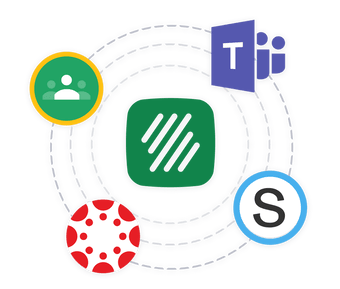
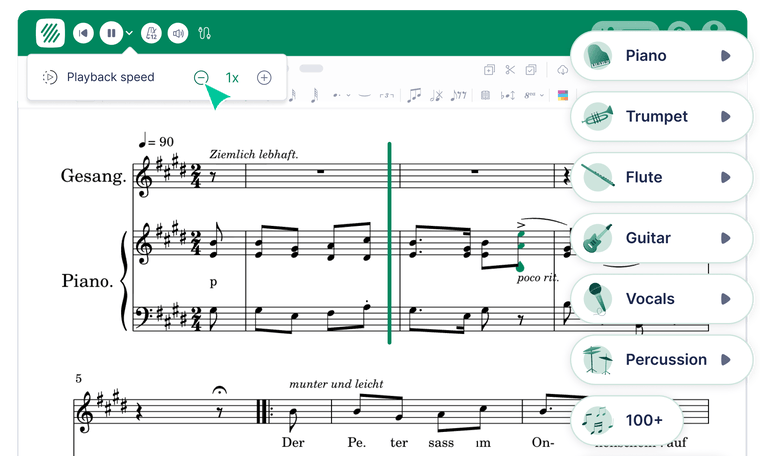
A classroom-ready notation editor with score creation, playback, PDF import, collaboration, teacher controls and student assignments built in.
In the browser
Professional-grade notation with no installation required: it works on Chromebooks, laptops and tablets. Supports standard notation, guitar and bass tablature, and lead sheets.
Import
PDF-to-Score turns a PDF into fully editable notation. One free import during the trial, and up to 350 credits on paid plans. Import MusicXML and MIDI files too.
Learn about PDF import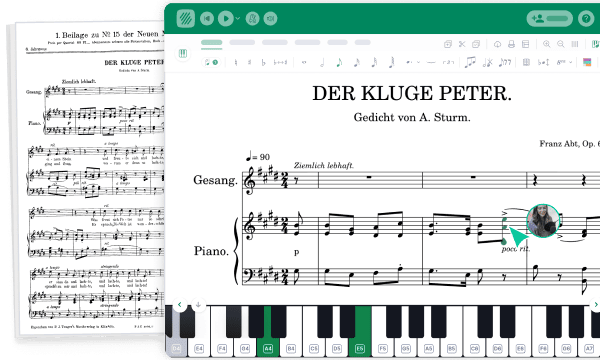
Teacher controls
Toolsets let you restrict or expand the notation palette for each task, so beginners are not overwhelmed and advanced students get the full editor.
Explore toolsets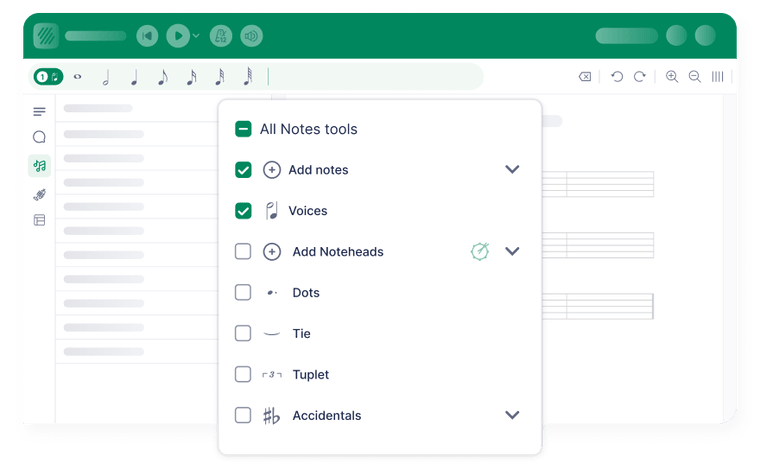
Pedagogy
Coloured and shaped noteheads (Boomwhacker colours, shape notes, pitch-in-notehead), Roman numerals for harmony, and automatically generated Kodály hand signs.
See pedagogy tools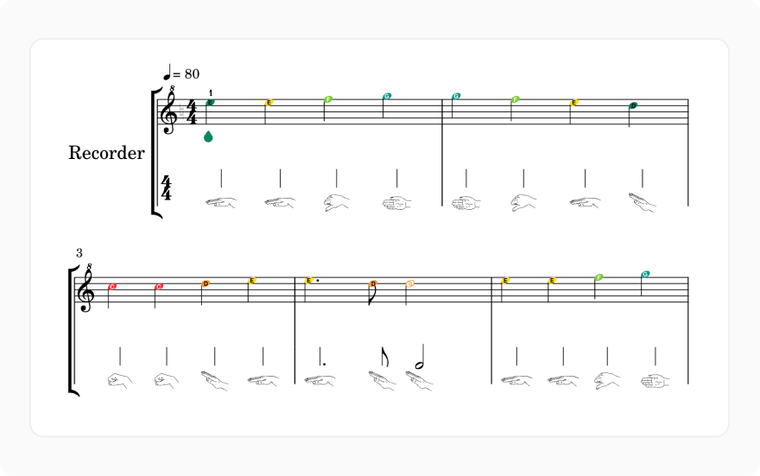
Collaboration
With Shared Writing, multiple students and teachers can edit the same score at once. Teachers can watch progress live and pin comments to specific notes or bars.
How collaboration works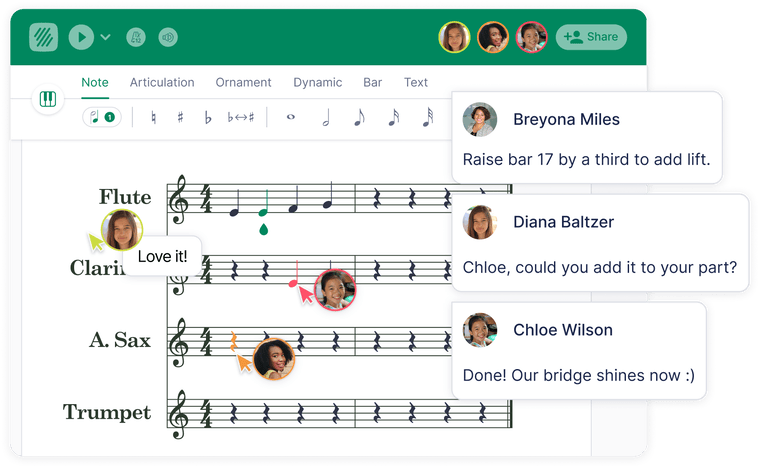
Export
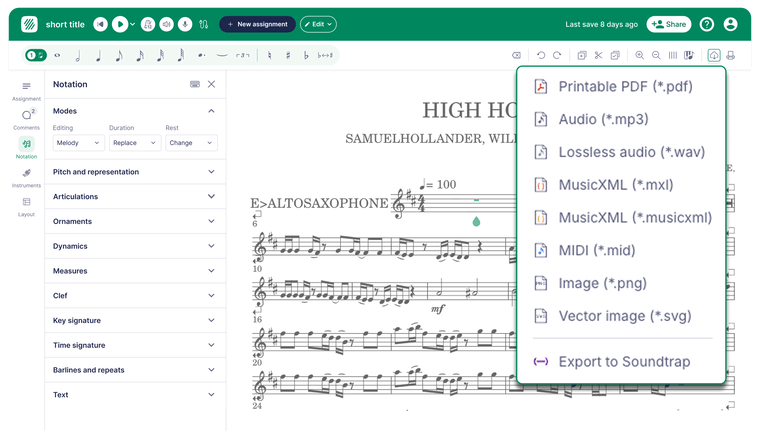
PDF, MusicXML, MIDI and MP3 — ready for Sibelius, Soundtrap and DAWs, as well as for portfolios and performances.
Version history & offline mode
Students can keep composing even with unreliable Wi-Fi, and every change is saved along the way. They can restore previous versions when needed, and offline edits sync automatically once they reconnect.
About version history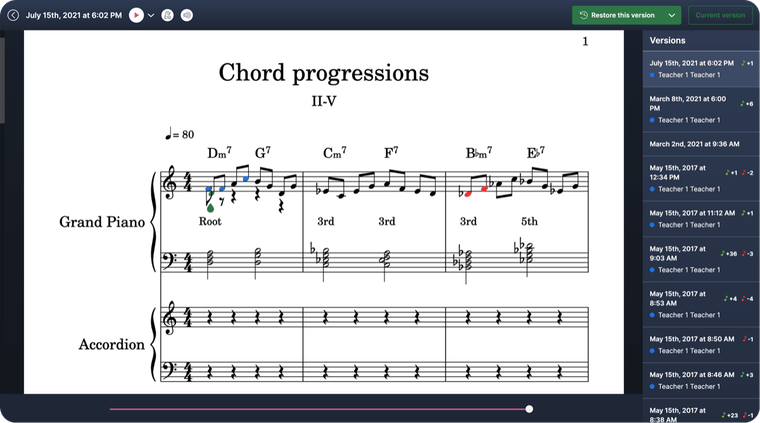
Sight-reading generator
Choose the instrument, difficulty level and settings to instantly generate unique scores for practice, assignments or assessments. Students get fresh material every time, while teachers spend less time searching for exercises.
Learn more about sight-reading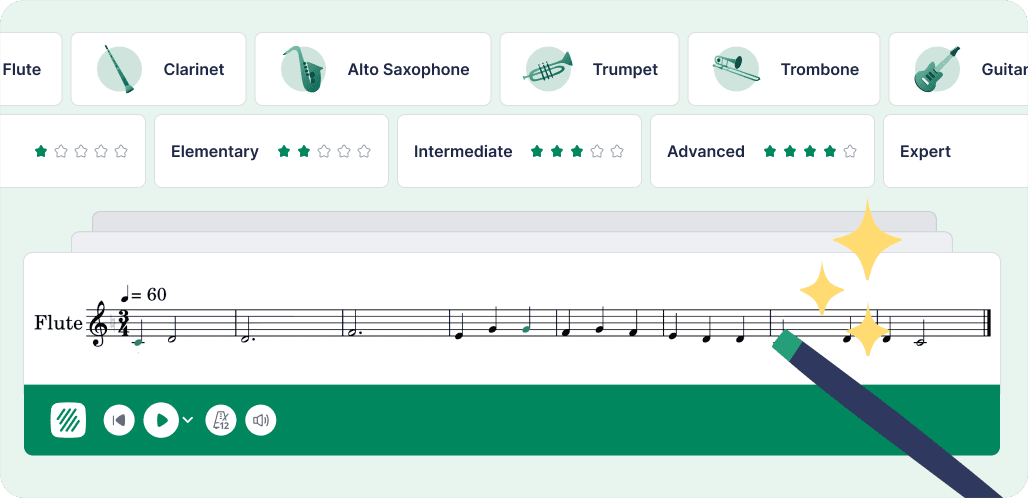
The same powerful music notation editor, with the controls, integrations, privacy and accessibility features classrooms need.
Send assignments and return grades through Google Classroom, Microsoft Teams, Canvas, Schoology and other supported LMS workflows.
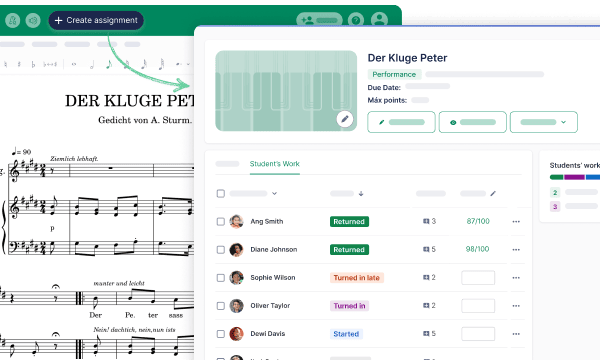
Create score-based assignments, choose student toolsets, monitor progress and give feedback from one classroom workspace.
Designed for schools, with support for FERPA, COPPA, GDPR and WCAG 2.1 AA.
Students can write music in a browser on Chromebooks, laptops and tablets. There’s nothing for IT to deploy.

I've been with Flat for a few years now and it truly has changed so many elements of my music courses... You should be proud of the work you're doing for the world's future musicians.

Adam Grenon
Durham District School Board (Canada)
Even in this new COVID world we are living in, I can set work for them from right here in my office and still have meaningful, in-depth discussions about what we are creating together, student by student.
Geoff Gould
Swift River Elementary School (MA, US)
Firstly, I would like to say a big thank you for creating such an amazing program for music. I've been using it for a few weeks now with my students and they are really enjoying it.

Alvaro Cortes
Director of Music and Drama, Holmwood House School (UK)

30-day free trial. Works across all devices.